Kasun Perera · Student
21 years old · Nugegoda. Travels between classes, libraries and extracurricular activities. A limited transport budget and a large campus make affordable, flexible options important.
Cooter — an e-bike rental app designed for a smartwatch.
Cooter is a smartwatch rental concept designed around the daily routines of university students and office workers in Colombo. It explores how users could locate a nearby vehicle, compare rental options and manage a ride through an Apple Watch interface.
Make a multi-step rental experience understandable on a compact display, with clear actions and useful ride information.
Research synthesis, personas, empathy mapping, paper wireframes and high-fidelity watch screens.
Two personas from the original case study connect everyday travel needs to interface decisions.
21 years old · Nugegoda. Travels between classes, libraries and extracurricular activities. A limited transport budget and a large campus make affordable, flexible options important.
35 years old · Maharagama. Balances daily office travel with work and personal commitments. Commute delays and competing responsibilities make speed and reliability priorities.
For Kasun, show vehicle options, example prices and range clearly before starting a rental.
For Chamodi, prioritise nearby options and visible ride status, with a direct path to the next rental action.
The original case study describes an online survey with open and closed questions exploring commuting habits, desired features, motivations and pain points. Personas and an empathy map organise those needs into a design direction.
Selected a user-friendly interface as an essential rental app feature (9 selections shown).
Selected seamless mobile integration as an essential feature (7 selections shown).
Selected affordable pricing as an essential feature (6 selections shown).
Reported commuting within the city every day in the original chart.
The research emphasises ease of use, technology integration and affordability. Those themes informed a straightforward rental flow, relevant vehicle details and recognisable actions.
Users need to know which vehicle is available and what its displayed price and range mean.
Clear ride status and feedback are important when moving from selection to unlocking and riding.
Source note: percentages are reproduced from the original survey charts. The charts label 37 responses, while the displayed feature counts and percentages imply 11; the sample total needs confirmation. Feature questions allowed up to three selections.
View original survey graphicsThe proposed journey follows five tasks: locate, compare, prepare, unlock and manage the ride.
A map provides location context. A vehicle list presents names, displayed range and example prices so users can compare options.
A payment concept and vehicle detail screen lead to an Unlock action. The technical authorisation method remains to be validated.
Elapsed time and distance appear alongside Pause and End Ride controls.
A summary state brings the ride to a clear conclusion.
This sequence interprets the displayed screens; a functioning vehicle integration is not established in the supplied material.
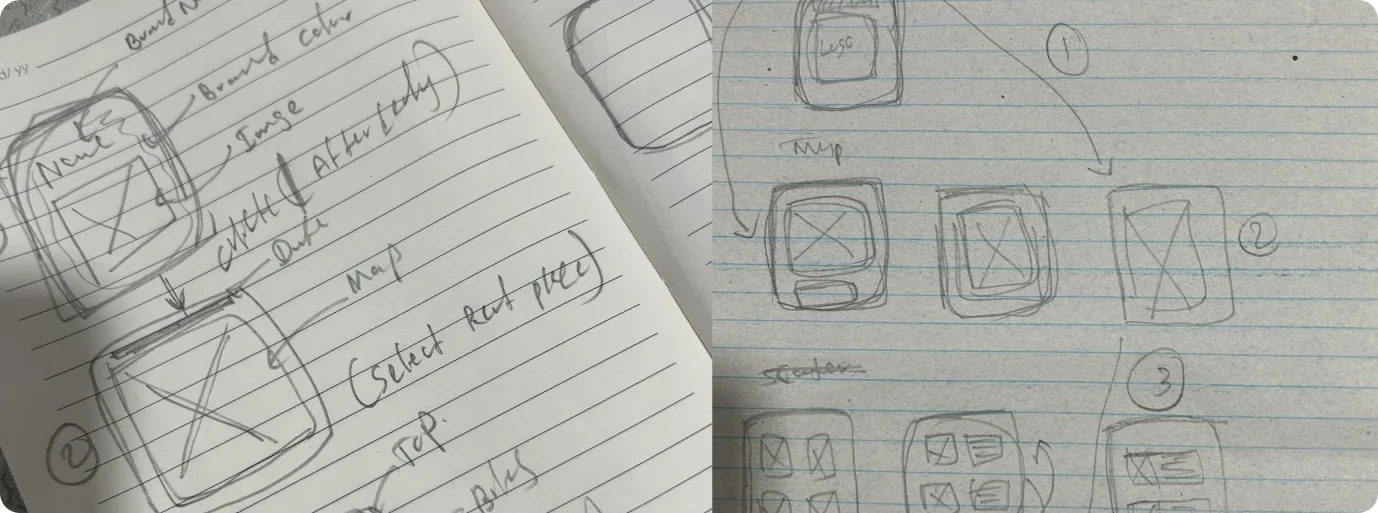
Paper wireframes explore map, selection and rental states before the interface receives its visual treatment.
The interface uses a dark background, compact vehicle cards and prominent green actions. Each state focuses on the information needed for the next decision.
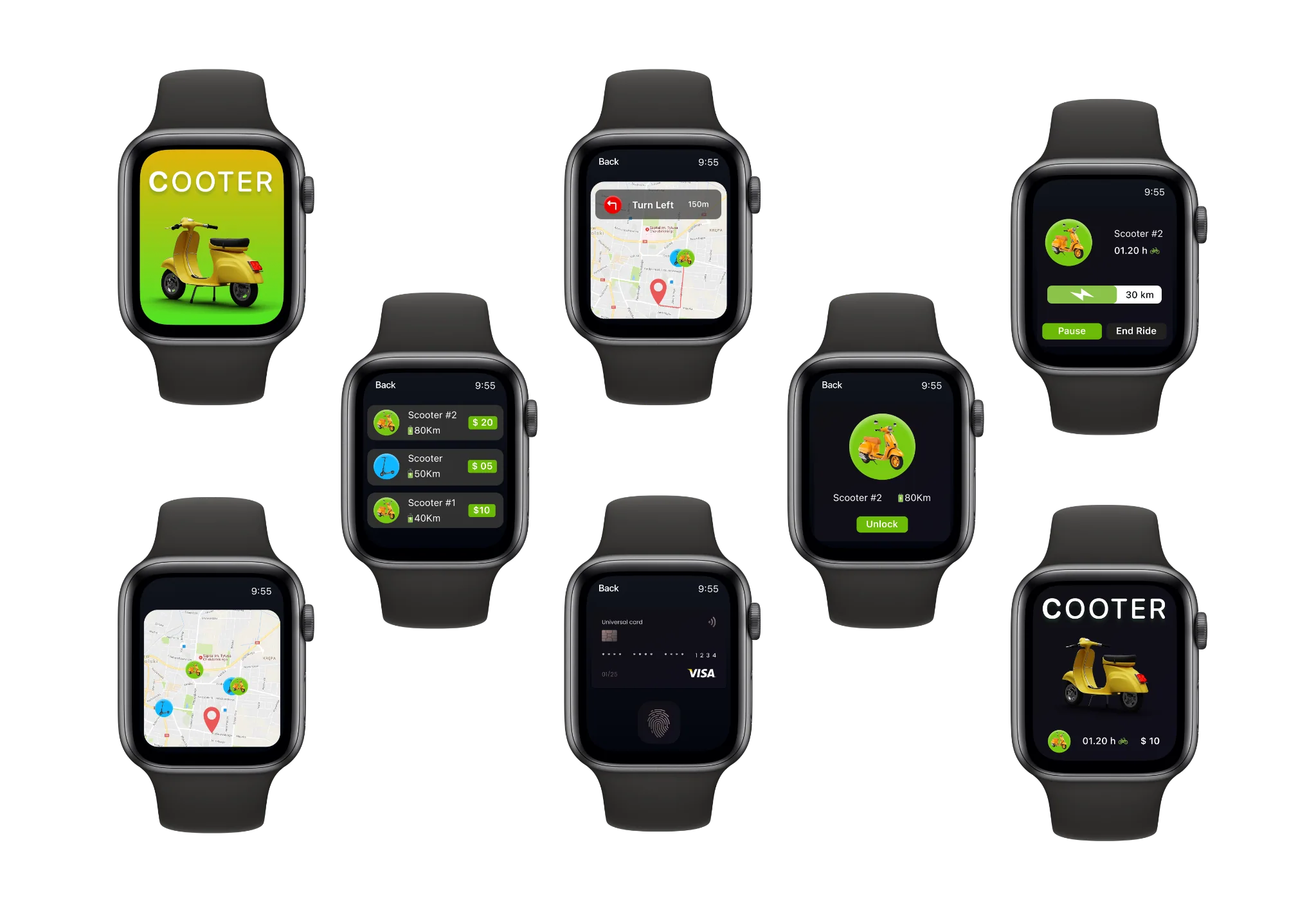
Maps help users locate an option, while separate vehicle cards support comparison.
Unlocking, active ride management and the summary each receive their own focused state.
The documented typography uses SF Pro and SF Pro Rounded. The original product visuals are preserved within the portfolio’s existing presentation.
I created a small design system to bring consistency to Cooter’s watch experience. Shared foundations and reusable component variants connect vehicle selection, unlocking and ride management.
Dark palette shown. Semantic colour variables support Dark and Light modes.
Primary, Secondary and Outline; Default and Compact sizes; Default, Pressed and Disabled states.
Default and Compact variants group vehicle, range and price. An outline identifies selection.
Brand and Muted price tags; High, Medium and Low battery indicators.
Orange motor-scooter and blue kick-scooter variants identify the available vehicle types.
40 variables across Primitives, Color, Spacing and Radius collections. Spacing: 4, 8, 12, 16, 24 and 32 px. Radius: 6, 10 and 16 px, plus full-round.
Cooter brings the rental journey into a tangible set of smartwatch screens supported by research material, personas, empathy mapping and paper wireframes.
A compact display demands prioritisation. Each screen should make the immediate task and available action understandable.
A smooth interface depends on reliable availability, range, pricing and ride status information.
Ask participants to find a vehicle, explain its price and range, start a rental, pause it and end it. Observe comprehension, completion, errors and assistance needed. Check legibility, touch targets and confirmation feedback on an actual watch, then test unavailable vehicles and failed unlock or payment states.